In this article
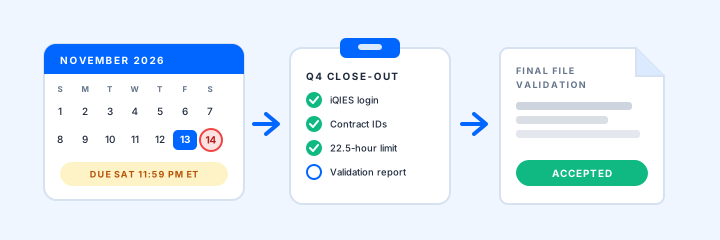
November 14 falls on a Saturday this year. That is the PBJ deadline for July through September, and CMS counts it in calendar days: 11:59 PM Eastern on the 45th day after the quarter ends. The iQIES Service Center takes calls Monday through Friday, so if a file fails on Saturday night, there is no one to call.
It is also the first quarter submitted entirely in iQIES. CMS accepted no fiscal Q4 submissions in either system from July 1 through August 16, and since August 17 only iQIES takes them. For many teams, it is the first full quarter close in the new system.
The basics are in our PBJ reporting guide, and the system change is in the PBJ-to-iQIES migration checklist. This post is the calendar for the last eleven days.
- This week Log in to iQIES, confirm roles, and reconcile July-September contract hours.
- By Tuesday, November 10 Upload the complete quarter, not a test slice.
- Within 24 hours Read the Final File Validation Report and the staffing reports.
- Friday, November 13 Make any last corrected upload while the Service Center is open.
Access: log in today, not on the 13th
Someone else usually has to fix an access problem, so find it first.
- The 60-day rule. CMS warns that iQIES users who do not log in for 60 days lose access. Anyone whose last login was during the August launch is past that mark.
- A PSO who can approve. Each facility must have at least one Provider Security Official, and new access stays inactive until a PSO approves it. A PSO on vacation the week of the 9th is a deadline risk.
- The right role. Only PSOs and PBJ Submitters can upload; the other PBJ roles are view-only.
- Vendors, building by building. A payroll or PBJ vendor must request access for each facility by CCN, with PSO approval at each one, and the facility stays responsible for what the vendor submits.
- The file version. Files in any version other than 4.10.0 have been rejected since April 1.
Contract hours: reconcile before you upload
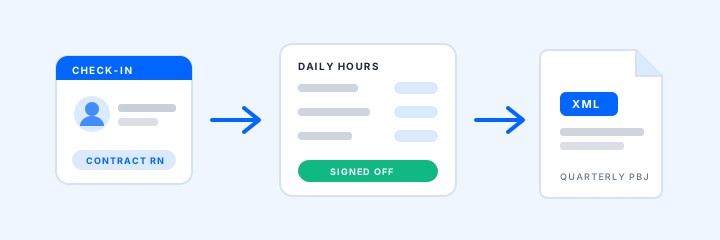
Agency and contract hours live in invoices and sign-in records, not payroll, so they slow quarter close. CMS's PBJ Policy Manual (version 2.8, August 2026) and FAQ set the rules that trip them up most.
After you upload: the validation report is the receipt
An upload confirmation is not the finish line. The policy manual says to check the Final File Validation Report in iQIES after the final upload, allows up to 24 hours for it, and says the system accepts nothing after the deadline: "There are no exceptions." The last accepted submission before the deadline counts as final.
- My Recent Submissions shows whether each file was accepted or rejected, with the error number for a rejection.
- The Final File Validation Report. Look for the system-generated report within 24 hours. If none appears, CMS says to run the PBJ Submitter Final File Validation Report (Payroll-Based Journal, Validation). Errors are grouped into sections such as General, Staffing, Employee, and Employee Link.
- The PBJ Staffing Summary and Individual Daily Staffing reports show what actually landed. Compare contract totals against your reconciliation.
- Census. CMS derives daily census from MDS assessments. A census higher than your records can point to missing discharge assessments, which make staffing per resident day look lower. Tell your MDS coordinator.
File the validation report PDF with its submission ID (iQIES IDs start at 100,000,000) in the quarter's PBJ folder.
Sources and current guidance
Last reviewed October 12, 2026.
- CMS Staffing Data Submission PBJ page
- CMS PBJ Policy Manual, version 2.8 (August 2026)
- CMS PBJ Policy FAQ (updated August 2026)
- CMS QSO-26-12-NH, revised September 11, 2026: PBJ transition to iQIES
- QTSO: What to expect for PBJ data submission and reporting in iQIES
- QTSO: Register for an iQIES account to submit PBJ data
ArrivSure supports provider-hour workflow and recordkeeping; it does not by itself establish PBJ compliance.
Want to see provider hours ready before next quarter's deadline? Request a demo.
Request a 20-Minute Demo