Rounds that don’t depend on a clipboard.
Build the assessment once and schedule it. Your staff get a daily queue on their iPhone, and you see who’s done, who’s behind, and what they found.
- Ready-made templates
- 8 question types
- Daily, weekly, or after admission
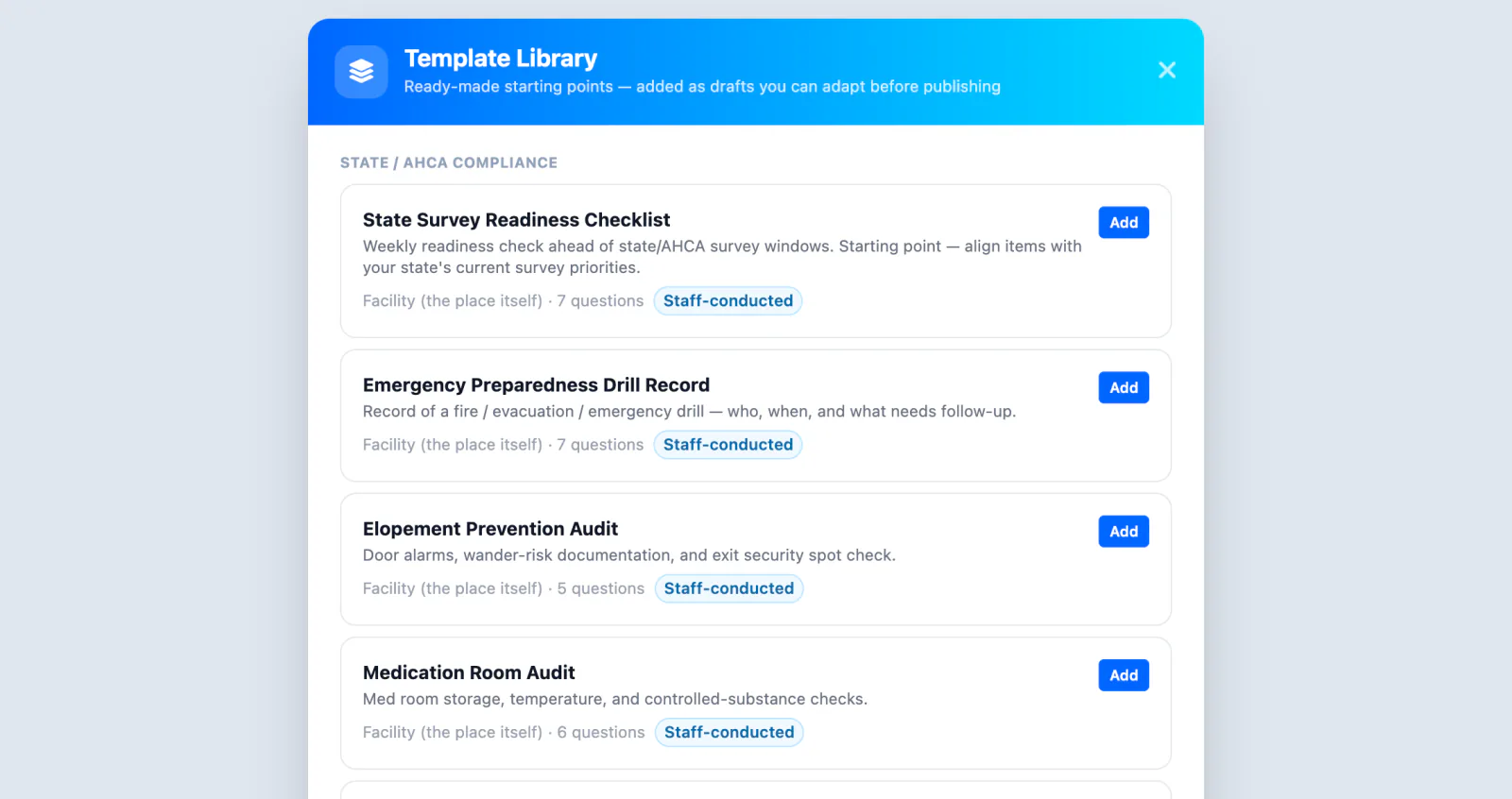
Start from a template. Make it yours.
Begin with ready-made templates like the State Survey Readiness Checklist, Emergency Preparedness Drill Record, Elopement Prevention Audit, and Medication Room Audit, or build your own. Templates keep their version history, so an assessment can change without losing past results.
- Eight question types, from star ratings to signed attestations
- Target residents, employees, providers, visitors, or the building
- Version history on every template
Set the schedule once. The work shows up on its own.
Pick an audience and a cadence, and ArrivSure creates the assignments for your staff. Daily rounds, a weekly check, or a follow-up three days after admission all run without anyone having to remember them.
- One-time, daily, or weekly
- A set number of days after admission or discharge
- Work not done by its due time is marked overdue
- DailyMedication Room AuditEvery day
- WeeklyElopement Prevention AuditEvery Monday
- After admissionNew admission follow-up3 days after each admission
- One timeEmergency Preparedness Drill RecordAssigned when you run a drill
A queue, not a clipboard
Writing the assessment is the easy part. Getting it done on every resident, every day, is the hard part. Staff open the Companion app to today’s queue, conduct each assessment at the bedside, and move on. Supervisors see what’s done and what’s outstanding.
- Today’s assessments in one queue
- At the bedside on iPhone, or at any workstation
- Every response tied to the resident and the staff member
- 14 of 22Daily resident roundsOne for each resident
- Due todayMedication Room AuditThe building · staff-conducted
- DoneElopement Prevention AuditThe building · staff-conducted
- OverdueState Survey Readiness ChecklistThe building · staff-conducted
One engine, every audience
Everything below is included with every plan.
Employee surveys
Survey your staff with the same templates and scheduling. Make it anonymous and still see who has finished.
Organized by purpose
Compliance and rounds, employee surveys, and patient surveys each get their own space and their own permissions.
Public & email forms
Collect responses from family members or staff who aren’t standing in the building.
Staff-conducted or self-completed
Staff complete rounds about a resident or the building. Employees answer surveys about themselves.
Exports & reporting
Completion dashboards and CSV exports of every response, ready for QA meetings and surveyors.
Visitor feedback, too
Private surveys after a visitor checks out live in Reputation Management.
Check-in figures: Avante at Inverness, 30 days. Location count as of September 2026. Review time reported by Avante.